
- Update25.09.2026
- Latest Version2.0.170
- Android OS6.0+
- LicenseFree
-
LanguagesEnglish العربية, Deutsch, English, Español, Français, हिन्दी, Bahasa Indonesia, Italiano, 日本語, 한국어, မြန်မာ, Português, Русский, ไทย, Türkçe, Tiếng Việt, 中文
- Content RatingEveryone
- DeveloperPhoto and Video App
- Package Nametweeter.gif.twittervideodownloader
Twitter Video Downloader app helps you to download Twitter videos and gif that you love to your device in the easy and quick way, so you can open the video anytime, anywhere you want or share it with your friends, save the internet traffic.
Featured:
💪 Download Twitter videos very easy and fast with some simple steps.
🏂 Use a database to save your query, save internet traffic, help you avoid download same Twitter videos | GIF.
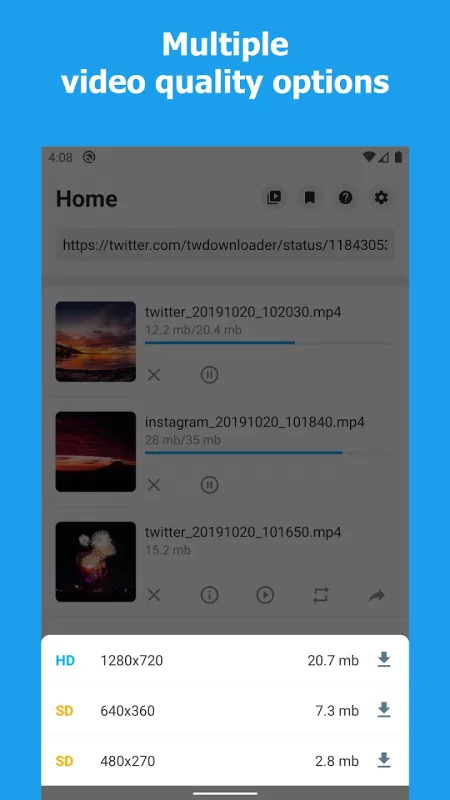
🏋️ Can choose the video resolutions(if +1 video available) to download.
💜 Can show the size of the download video, easy to decide which the video you should download.
🤺 Built-in share function, easy to share the actual video to other social apps such as Snapchat, Instagram, WhatsApp, Facebook...
⛹️ The downloaded videos saved to external storage, help you can play or access from other apps, like the gallery, file manager, video player app...
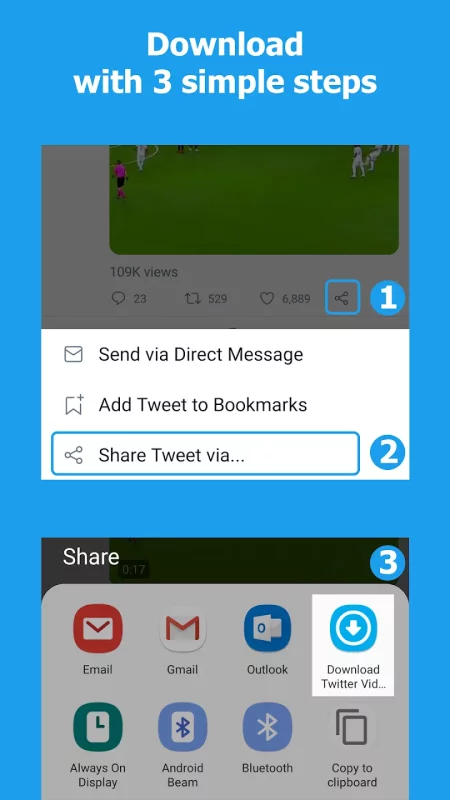
🏆 2 easy ways to download videos from Twitter, you can either copy/paste the link or access it directly from share options(recommended).
🏄 Built-in download manager, easy to control download progress.
🥅 Built-in Video Player, play video & gif.
🎻 Easy to access the downloaded video, view its path, play or share it.
🚣 Can save gif from Twitter.
🏇 Multi-task download, download a lot of files at the same time.
💘 Very little advertising, best user experience, you will love it.
🎖 Lightweight, only 2.9 Mb.
How to download Twitter videos with this app?, it's very easy and simple:
1️⃣ In the Twitter app, below the video or gif that you love, click the share icon.
2️⃣ Choose Share Tweet via...
3️⃣ Choose Download Twitter videos app.
4️⃣ Inside the download twitter videos app, click the download icon.
5️⃣ Select the video resolution that you want if +1 video available.
6️⃣ Wait or browse other twitter videos.
Another way to download twitter videos is copying the tweet that contains video or gif and pastes the link to the app if you don't open it yet, or it will automatically paste the link. Then click the download icon.
💪💪💪 Let's install this awesome Twitter video downloader app now! 💪💪💪
Notes:
✘ Do not use Download Twitter Videos app to save videos, save gifs or retweet them without the permission of respective owner. We respect the rights of Twitter.
✘ This Twitter video downloader app is not affiliated with Twitter, but it is a tool to help download videos from Twitter, save gif from Twitter.
If Download Twitter Videos app is helpful for you, please rate me 🌟🌟🌟🌟🌟, improve this app by giving me a feedback in the comment box, I will make it better.
If you need to support, please email me [email protected].
Thank you for using Download Twitter Videos app.



Download Download Twitter Videos - GIF for Android for free
- Download the XAPK file to your Android device.
- Install one of these installers from our website:
- Open the installer and select the downloaded file from the Downloads folder.
- Allow installation from this source if Android asks for permission.
- Start installation. To update the app, install the newer file without uninstalling the current version.