• Update
    30.07.2026
  • Latest Version
    21.30.209
  • Android OS
    10+
  • License
    Free
  • Languages
    English
  • Content Rating
    Teen
  • Developer
  • Downloads
    4
  • Package Name
    com.google.android.youtube

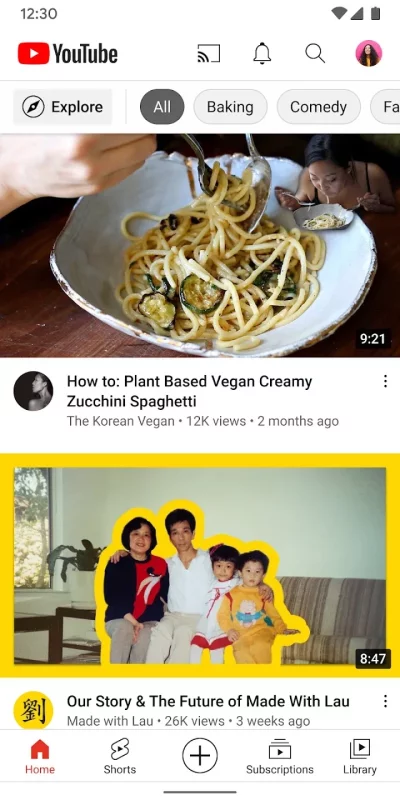
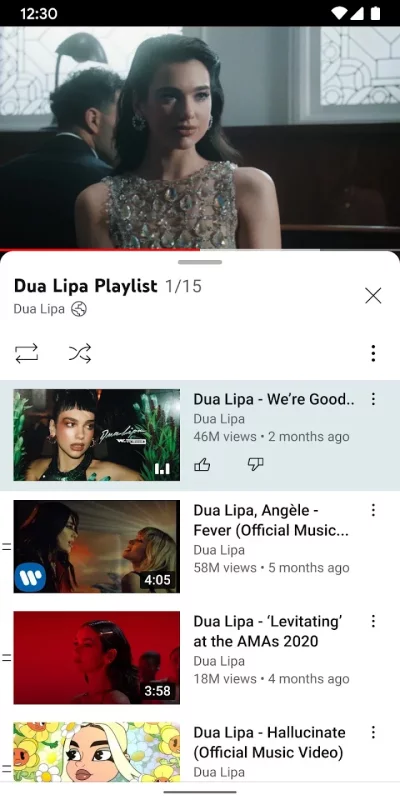
Get the official YouTube app on Android phones and tablets. See what the world is watching -- from the hottest music videos to what’s popular in gaming, fashion, beauty, news, learning and more. Subscribe to channels you love, create content of your own, share with friends, and watch on any device.

Watch and subscribe
● Browse personal recommendations on Home
● See the latest from your favorite channels in Subscriptions
● Look up videos you’ve watched, liked, and saved for later in Library

Explore different topics, what’s popular, and on the rise (available in select countries)
● Stay up to date on what’s popular in music, gaming, beauty, news, learning and more
● See what’s trending on YouTube and around the world on Explore
● Learn about the coolest Creators, Gamers, and Artists on the Rise (available in select countries)

Connect with the YouTube community
● Keep up with your favorites creators with Posts, Stories, Premieres, and Live streams
● Join the conversation with comments and interact with creators and other community members

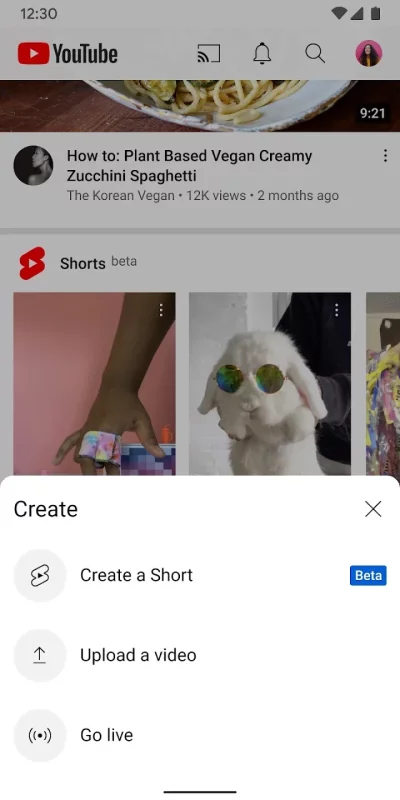
Create content from your mobile device
● Create or upload your own videos directly in the app
● Engage with your audience in real time with live streaming right from the app

Find the experience that fits you and your family (available in select countries)
● Every family has their own approach to online video. Learn about your options: the YouTube Kids app or a new parent supervised experience on YouTube at youtube.com/myfamily

Support creators you love with channel memberships (available in select countries)
● Join channels that offer paid monthly memberships and support their work
● Get access to exclusive perks from the channel & become part of their members community
● Stand out in comments and live chats with a loyalty badge next to your username

Upgrade to YouTube Premium (available in select countries)
● Watch videos uninterrupted by ads, while using other apps, or when the screen is locked
● Save videos for when you really need them – like when you’re on a plane or commuting
● Get access to YouTube Music Premium as part of your benefits

Download YouTube for Android for free

Download YouTube 21.30.209 xapk Android 10+ ARMV8
145.97 Mb
No viruses found
Permissions (35)
Detections: 0
Check date: 30 July 2026, 07:05
The file was scanned for viruses using VirusTotal.
ACCESS_COARSE_LOCATION - allows an app to access approximate location.
ACCESS_FINE_LOCATION - allows an app to access precise location.
ACCESS_NETWORK_STATE - allows applications to access information about networks.
ACCESS_WIFI_STATE - allows applications to access information about wi-fi networks.
CAMERA - required to be able to access the camera device.
DETECT_SCREEN_CAPTURE - allows an application to get notified when a screen capture of its windows is attempted.
FOREGROUND_SERVICE - allows a regular application to use service.startforeground.
FOREGROUND_SERVICE_CAMERA - allows a regular application to use service.startforeground with the type "camera".
FOREGROUND_SERVICE_DATA_SYNC - allows a regular application to use service.startforeground with the type "datasync".
FOREGROUND_SERVICE_MEDIA_PLAYBACK - allows a regular application to use service.startforeground with the type "mediaplayback".
FOREGROUND_SERVICE_MEDIA_PROJECTION - allows a regular application to use service.startforeground with the type "mediaprojection".
FOREGROUND_SERVICE_MICROPHONE - allows a regular application to use service.startforeground with the type "microphone".
GET_ACCOUNTS - allows access to the list of accounts in the accounts service.
GET_PACKAGE_SIZE - allows an application to find out the space used by any package.
HIGH_SAMPLING_RATE_SENSORS - allows an app to access sensor data with a sampling rate greater than 200 hz.
INTERNET - allows applications to open network sockets.
MANAGE_DOCUMENTS - allows an application to manage access to documents, usually as part of a document picker.
MODIFY_AUDIO_SETTINGS - allows an application to modify global audio settings.
NFC - allows applications to perform i/o operations over nfc.
POST_NOTIFICATIONS - allows an app to post notifications
READ_CONTACTS - allows an application to read the user's contacts data.
READ_EXTERNAL_STORAGE - allows an application to read from external storage.
READ_MEDIA_IMAGES - allows an application to read image files from external storage.
READ_MEDIA_VIDEO - allows an application to read video files from external storage.
READ_MEDIA_VISUAL_USER_SELECTED - allows an application to read image or video files from external storage that a user has selected via the permission prompt photo picker.
READ_PHONE_STATE - allows read only access to phone state, including the current cellular network information, the status of any ongoing calls, and a list of any phoneaccounts registered on the device.
RECEIVE_BOOT_COMPLETED - allows an application to receive the intent.action_boot_completed that is broadcast after the system finishes booting.
RECORD_AUDIO - allows an application to record audio.
RUN_USER_INITIATED_JOBS - allows applications to use the user-initiated jobs api.
SYSTEM_ALERT_WINDOW - allows an app to create windows using the type windowmanager.layoutparams.type_application_overlay, shown on top of all other apps.
USE_BIOMETRIC - allows an app to use device supported biometric modalities.
USE_FINGERPRINT - this constant was deprecated in api level 28. applications should request use_biometric instead
VIBRATE - allows access to the vibrator.
WAKE_LOCK - allows using powermanager wakelocks to keep processor from sleeping or screen from dimming.
WRITE_EXTERNAL_STORAGE - allows an application to write to external storage.
SHA1 signature: f8456b1d9986acf9ce21fb450b0d32b895f36885
SHA256 signature: 5aad2bee6db95d17e05a08d7d1e64c10a1511879154483916b6ae6c7fd9cb0c6
How to install APK
  1. Download the APK file to your Android device.
  2. Find the file in the Downloads folder and open it.
  3. Allow installation from this source if Android blocks it.
  4. Tap Install. To update the app, install the newer APK without uninstalling the current version.
How to install XAPK
  1. Download the XAPK file to your Android device.
  2. Install one of these installers from our website:
  3. Open the installer and select the downloaded file from the Downloads folder.
  4. Allow installation from this source if Android asks for permission.
  5. Start installation. To update the app, install the newer file without uninstalling the current version.
⚠If the download fails or gets stuck, try enabling a VPN, disabling your ad blocker, or switching to a different network.
More by Google LLC
Google Docs
Google Docs
Create, edit, and collaborate with others on documents from your Android phone or tablet with the
YouTube Music
YouTube Music
Connecting you to the world of music: ● Music content including live performances, covers, remixes
Google Messages
Google Messages
Google Messages is the official Google app for messaging. Google Messages is revolutionizing how a
Gmail
Gmail
The official Gmail app brings the best of Gmail to your Android phone or tablet with enhanced
See also
WhatsApp Messenger
WhatsApp Messenger
WhatsApp from Meta is a FREE messaging and video calling app. It’s used by over 2B people in more
Comments (0)
Loading comments...