Video Downloader for Twitch

Video Downloader for Twitch

0 votes
  • Update
    26.09.2026
  • Latest Version
    26.8.070
  • Android OS
    12.1+
  • License
    Free
  • Languages
    English
  • Content Rating
    Teen
  • Developer
  • Package Name
    com.videodownloader.twitchvoddownloader.downloadtwitchvideo

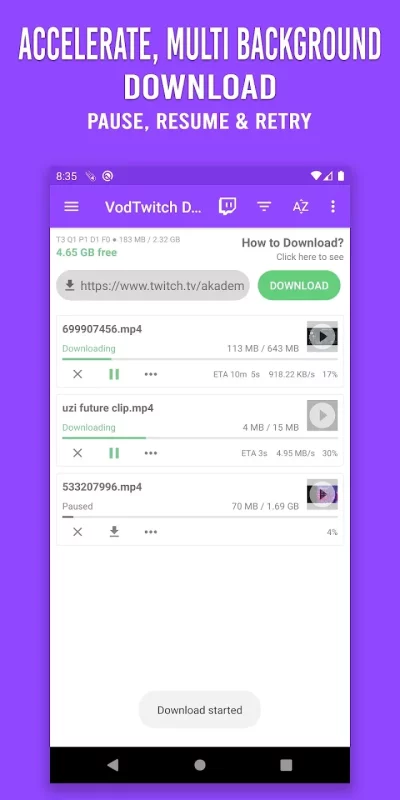
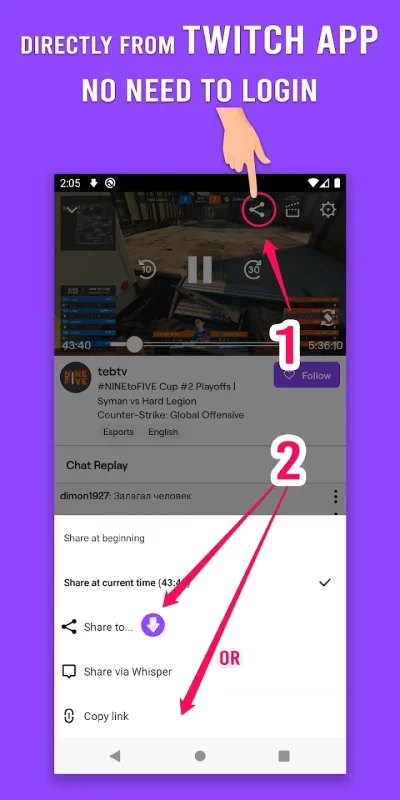
Fast download Twitch videos, VOD, Clips with just one click. No limit, download HD 1080 at 60fps. You really need to try this one! It’s 100% FREE! No need to login any browser, use your Twitch mobile app or Twitch website on your favorite browser. Your account is safe.

Support download Sub-only VODs
We have an option for you to download subscribed only VODs. To do this you need to sign into Twitch with the subscribed account. Then you can download these restricted videos like normal videos.
You don't need to sign into Twitch when you download normal or public videos.

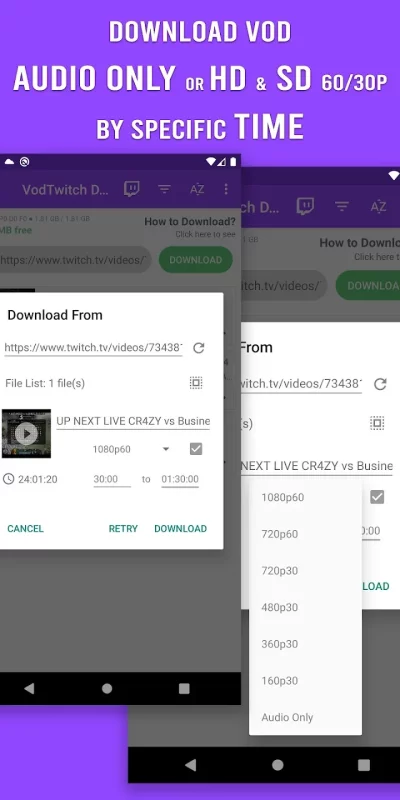
Support download Audio Only
Support download by specific time (from time to time)
Automatically sync your videos and clips to your Gallery

SD Card is supported. Download video to SDcard easily and fast to save your internal storage.

Multi-thread tech is supported; download speed 3x faster. Share with your friends or on other social media.

You can easily download your favorite videos VOD and Clip from Twitch. Watch Twitch video offline anytime anywhere.

Support languages: English, Deutsche (German), Français (French), 日本語 (Japanese), 한국어 (Korean), Português (Portuguese), Español (Spanish), Tiếng Việt (Vietnamese), Pусский (Russian), Italiano (Italian)

How to download?
1. Open Twitch app. Click "Copy link" of the video or clip you want.
2. Go back to the Downloader. Done! The video or clip will be auto downloaded.

Why Video Downloader for Twitch
⭐ No need to log in. Keep your data 100% safe, no worries about privacy.
⭐ Fast download, multi threading, 3x speed up.
⭐ Download Audio only
⭐ Download & save as MP4 and MP3 files
⭐ Download by specific time (from time to time)
⭐ Auto gallery syncing
⭐ Pause, resume, retry when error.
⭐ HD video download. Support multi resolution options: 1080p, 720p, 480p, 360p, 160p. Support download video 60fps and 30fps.
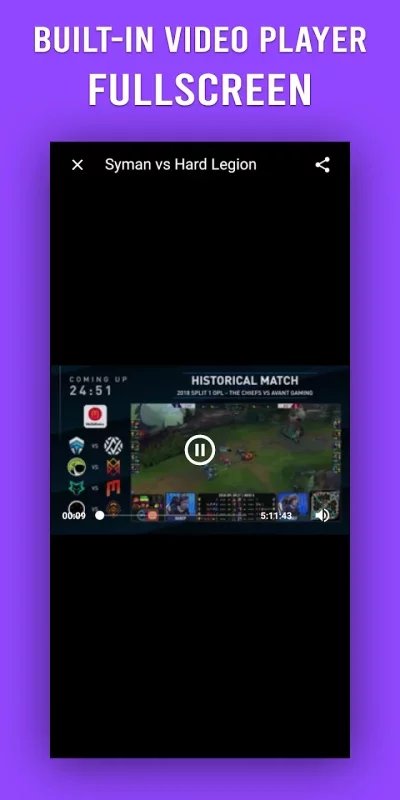
⭐ Built-in video & audio player, full screen player.

So easy. Download Video Downloader for Twitch, NOW!

Disclaimers:
* This app is NOT affiliated with or endorsed by Twitch.
* Any unauthorized actions (re-uploading or downloading of contents) and/or violations of intellectual property rights is the sole responsibility of the user.
Download Video Downloader for Twitch for Android for free

Download Video Downloader for Twitch 26.8.070 xapk Android 12.1+ ARMV8
15.09 Mb
Permissions (16)
ACCESS_NETWORK_STATE - allows applications to access information about networks.
ACCESS_WIFI_STATE - allows applications to access information about wi-fi networks.
FOREGROUND_SERVICE - allows a regular application to use service.startforeground.
FOREGROUND_SERVICE_DATA_SYNC - allows a regular application to use service.startforeground with the type "datasync".
FOREGROUND_SERVICE_MEDIA_PLAYBACK - allows a regular application to use service.startforeground with the type "mediaplayback".
INTERNET - allows applications to open network sockets.
POST_NOTIFICATIONS - allows an app to post notifications
READ_EXTERNAL_STORAGE - allows an application to read from external storage.
RECEIVE_BOOT_COMPLETED - allows an application to receive the intent.action_boot_completed that is broadcast after the system finishes booting.
REORDER_TASKS - allows an application to change the z-order of tasks.
SET_WALLPAPER - allows applications to set the wallpaper.
VIBRATE - allows access to the vibrator.
WAKE_LOCK - allows using powermanager wakelocks to keep processor from sleeping or screen from dimming.
WRITE_EXTERNAL_STORAGE - allows an application to write to external storage.
WRITE_SETTINGS - allows an application to read or write the system settings.
SHA1 signature: 3e9f4b43eb589a337ade3ade4b4d887d35c1a9d2
SHA256 signature: e6eb58df31ff78ff61b4aae7b6e6fabfe6a5e53d3b51f65c911961972aa0acdd
How to install XAPK
  1. Download the XAPK file to your Android device.
  2. Install one of these installers from our website:
  3. Open the installer and select the downloaded file from the Downloads folder.
  4. Allow installation from this source if Android asks for permission.
  5. Start installation. To update the app, install the newer file without uninstalling the current version.

⚠If the download fails or gets stuck, try enabling a VPN, disabling your ad blocker, or switching to a different network.
See also
Funimate Video Editor & Maker
Funimate is the best video editing app you can find on mobile! Join millions of Funimate users who
Video Downloader
Video Downloader
Easily download videos and music directly from the Internet onto your device. All formats are
Video Maker
Video Maker
Video.Guru - AI video maker and video editor from photo & music. The most user friendly
Screen Recorder - XRecorder
NO watermark NO root needed NO recording time limit Screen Recorder & Video Recorder -
Video Player All Format
Video Player All Format is a professional video playback tool. XPlayer supports setting passwords
X Sexy Video Downloader
HOT Search, browse, play and download! Try now our all-in-one app! ⭐⭐⭐⭐⭐ The video downloader auto
GoPro Quik: Video Editor
With Quik, editing just got easier. Get the most out of your favorite shots with Automatic
Google TV
Google TV
Google TV, previously Play Movies & TV, makes it easy to find and enjoy the entertainment you
Comments (0)
Loading comments...