Opera: Private Web Browser

Opera: Private Web Browser

0 votes
  • Update
    17.09.2026
  • Latest Version
    101.6.5178.90208
  • Android OS
    12.1+
  • License
    Free
  • Languages
    English
  • Content Rating
    Everyone
  • Developer
  • Package Name
    com.opera.browser

Ditch the default and switch to a browser that works as hard as you do. Opera combines high-performance browsing with a built-in VPN, an advanced Ad Blocker, and a cutting-edge AI assistant. Experience a cleaner, faster, and more private web, no extensions required.

✓ Smart Browsing with AI
✓ Built-in Ad Blocker
✓ Free Built-in VPN
✓ Live scores & Sports alerts
✓ Smart Download manager
✓ Data savings mode
✓ Seamless Sync & Flow
✓ Fully Personalized Browser

• Smart Browsing with AI & Creativity
Upgrade your browsing with integrated AI. Chat with our native assistant to get instant answers, summarize long articles, or brainstorm ideas. Feeling creative? Use our built-in AI Image Generator to turn your words into stunning visuals in seconds. Create custom wallpapers, unique social posts, or images for work, all without leaving your browser.

• Ad Blocker
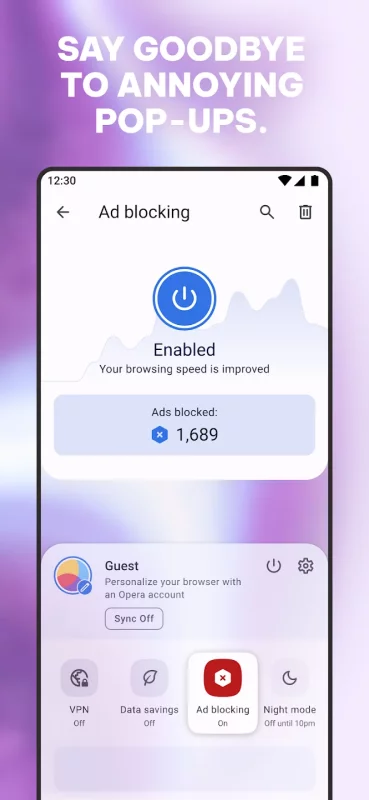
Opera’s built-in Ad Blocker ensures pages load faster and your battery lasts longer. Experience the web with fewer interruptions, watch videos with fewer ads, and block intrusive pop-ups. You can also manage cookie and privacy dialogs directly in your Settings for a cleaner, smoother experience.

• Built-in Free VPN
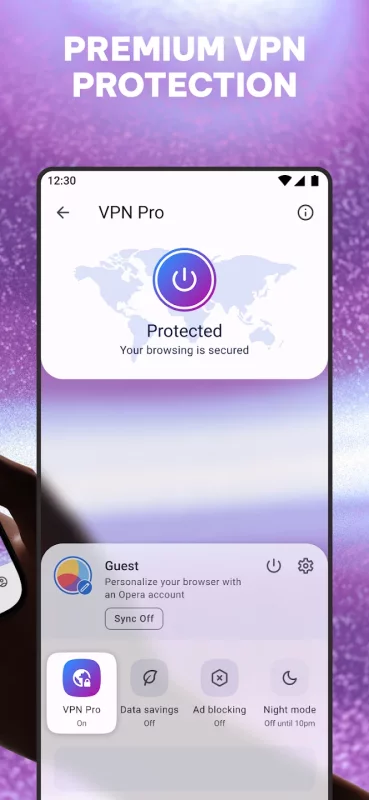
Opera includes a Free VPN to keep your browsing private. The VPN encrypts your internet connection, helping you stay incognito and protecting your personal details. Choose from three virtual locations with no subscription or login needed.

• Powerful Downloader & Offline Pages
Stop worrying about patchy internet. Opera’s downloader lets you grab videos and music whenever they’re available. Downloads happen in the background and automatically resume if the connection drops. Traveling? Save any page to your Offline Pages to access it later without a signal. Use the "Save as PDF" feature to instantly convert pages for easy offline reading.

• Data Savings
Don’t let high data costs limit your browsing. Opera’s Data-saving mode uses smart compression to significantly reduce the weight of every page you visit. It’s the most efficient way to browse more while using less data, ensuring a reliable connection even on weak networks.

• Private Browser
Enhance your web privacy with a built-in Free VPN and Ad Blocker. Use private search and incognito tabs to browse the web without leaving a trace. When you close your tabs, your browsing tracks are cleared automatically.

• Flow & Seamless Sync
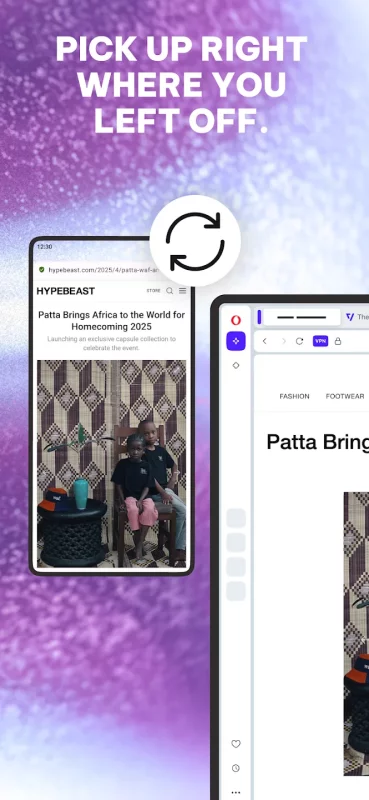
Pick up where you left off on any device. Share files, links, and notes across all your devices instantly with Flow. Your history and bookmarks stay synced across mobile and desktop—all you need is one Opera Account.

• Custom Newsfeed
Follow the topics you care about in a fully customizable newsfeed. Not interested in certain topics? Just deselect the noise to tailor your feed. You can also download articles to read later while offline to stay up to date anywhere.

• Personalized Browser
Make the browser your own. Customize your settings to fit your preferences: homepage, search engine, wallpaper, and more. Use Night Mode to dim the screen and protect your eyes during late-night browsing.

Download Opera: Private Web Browser for Android for free

Download Opera: Private Web Browser 101.6.5178.90208 xapk Android 12.1+ ARMV8
221.09 Mb
No viruses found
Permissions (27)
Detections: 0
Check date: 17 September 2026, 15:50
The file was scanned for viruses using VirusTotal.
ACCESS_COARSE_LOCATION - allows an app to access approximate location.
ACCESS_FINE_LOCATION - allows an app to access precise location.
ACCESS_NETWORK_STATE - allows applications to access information about networks.
ACCESS_WIFI_STATE - allows applications to access information about wi-fi networks.
BLUETOOTH - allows applications to connect to paired bluetooth devices.
CAMERA - required to be able to access the camera device.
CHANGE_WIFI_MULTICAST_STATE - allows applications to enter wi-fi multicast mode.
FOREGROUND_SERVICE_DATA_SYNC - allows a regular application to use service.startforeground with the type "datasync".
FOREGROUND_SERVICE_MEDIA_PLAYBACK - allows a regular application to use service.startforeground with the type "mediaplayback".
FOREGROUND_SERVICE_SYSTEM_EXEMPTED - allows a regular application to use service.startforeground with the type "systemexempted".
INTERNET - allows applications to open network sockets.
MODIFY_AUDIO_SETTINGS - allows an application to modify global audio settings.
NFC - allows applications to perform i/o operations over nfc.
POST_NOTIFICATIONS - allows an app to post notifications
READ_BASIC_PHONE_STATE - allows read only access to phone state with a non dangerous permission, including the information like cellular network type, software version.
READ_EXTERNAL_STORAGE - allows an application to read from external storage.
READ_SYNC_SETTINGS - allows applications to read the sync settings.
RECEIVE_BOOT_COMPLETED - allows an application to receive the intent.action_boot_completed that is broadcast after the system finishes booting.
RECORD_AUDIO - allows an application to record audio.
RUN_USER_INITIATED_JOBS - allows applications to use the user-initiated jobs api.
SET_WALLPAPER - allows applications to set the wallpaper.
SYSTEM_ALERT_WINDOW - allows an app to create windows using the type windowmanager.layoutparams.type_application_overlay, shown on top of all other apps.
VIBRATE - allows access to the vibrator.
WAKE_LOCK - allows using powermanager wakelocks to keep processor from sleeping or screen from dimming.
WRITE_EXTERNAL_STORAGE - allows an application to write to external storage.
WRITE_SYNC_SETTINGS - allows applications to write the sync settings.
INSTALL_SHORTCUT - allows an application to install a shortcut in launcher.
SHA1 signature: ebe9f902c7e1fb068d7ea40dc4f2d83a6ffca41e
SHA256 signature: 5d6afbf87f652af04647ada0df634cf22370900b164b09d50bd23aa2cb5285b8
How to install XAPK
  1. Download the XAPK file to your Android device.
  2. Install one of these installers from our website:
  3. Open the installer and select the downloaded file from the Downloads folder.
  4. Allow installation from this source if Android asks for permission.
  5. Start installation. To update the app, install the newer file without uninstalling the current version.

⚠If the download fails or gets stuck, try enabling a VPN, disabling your ad blocker, or switching to a different network.
More by Opera
Opera Mini: Fast Web Browser
Browse fast, stay secure and do more with Opera Mini. Access your favorite apps through Speed Dial,
See also
Yahoo Mail: Email & Planner
YAHOO MAIL: THE SMART INBOX DESIGNED TO SIMPLIFY YOUR LIFE Yahoo Mail is the ultimate smart inbox
BOSS Revolution: Call & Top up
🎁 10% automatic saving on your First International Mobile Top-Up and $2 Free for Calling. 📞 Crystal
Firefox Fast & Private Browser
The internet. As it should be. Firefox is a private web browser designed to protect your data,
Microsoft Edge
Microsoft Edge
Browse with Microsoft Edge, your everyday web browser with built-in Copilot. From finding
Messenger
Messenger
Messenger is a free messaging app that helps you connect with anyone, anywhere. Stay in touch with
Telegram
Telegram
Pure instant messaging — simple, fast, secure, and synced across all your devices. One of the top 5
WhatsApp Messenger
WhatsApp Messenger
WhatsApp from Meta is a FREE messaging and video calling app. It’s used by over 2B people in more
Gmail
Gmail
The official Gmail app brings the best of Gmail to your Android phone or tablet with enhanced
Comments (0)
Loading comments...