Google Pay: Save and Pay

Google Pay: Save and Pay

0 votes
  • Update
    25.09.2026
  • Latest Version
    349.1.2 (arm64-v8a_release_flutter)
  • Android OS
    12.1+
  • License
    Free
  • Languages
    English
  • Content Rating
    Everyone
  • Developer
  • Package Name
    com.google.android.apps.nbu.paisa.user

Important update:
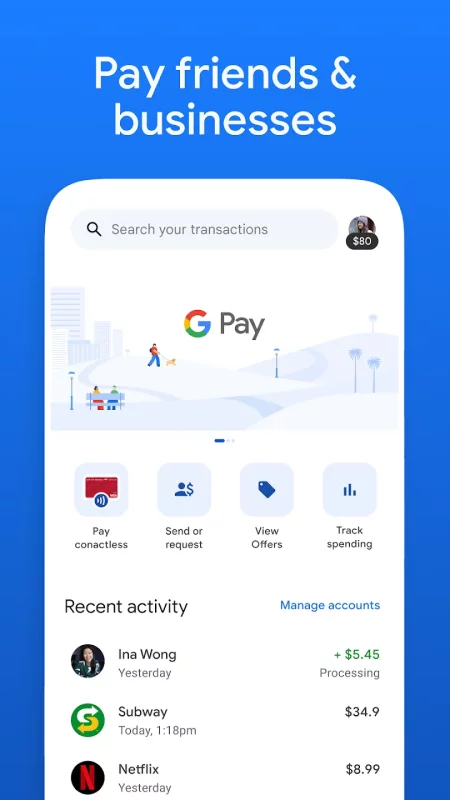
The U.S. version of the standalone Google Pay app is no longer available for use. Please download the Google Wallet app to tap and pay with Google Pay.

Google Payment Corporation's Customer Service and Error Resolution Policy and applicable processes still apply to report unauthorized transactions related to Google Pay. If you have any further questions about your balance in the app, you can learn more about your Google Pay balance.

Still have questions? Head over to https://support.google.com/googlepay

*Payments processed by Google Payment Corp., a licensed money transmitter (NMLS ID: 911607). Licensed as a money transmitter by the NY State Dept. of Financial Services and to Transmit Money By Check, Draft or Money Order By The Department of Banking and Securities, Commonwealth of Pennsylvania. To learn more about Google Payments, visit the Google Payments Help Center.
Download Google Pay: Save and Pay for Android for free

Download Google Pay: Save and Pay 349.1.2 (arm64-v8a_release_flutter) xapk Android 12.1+ ARMV8
80.16 Mb
No viruses found
Permissions (25)
Detections: 0
Check date: 25 September 2026, 17:30
The file was scanned for viruses using VirusTotal.
ACCESS_BACKGROUND_LOCATION - allows an app to access location in the background.
ACCESS_COARSE_LOCATION - allows an app to access approximate location.
ACCESS_FINE_LOCATION - allows an app to access precise location.
ACCESS_NETWORK_STATE - allows applications to access information about networks.
CAMERA - required to be able to access the camera device.
GET_ACCOUNTS - allows access to the list of accounts in the accounts service.
GET_PACKAGE_SIZE - allows an application to find out the space used by any package.
HIDE_OVERLAY_WINDOWS - allows an app to prevent non-system-overlay windows from being drawn on top of it
INTERNET - allows applications to open network sockets.
MODIFY_AUDIO_SETTINGS - allows an application to modify global audio settings.
NFC - allows applications to perform i/o operations over nfc.
POST_NOTIFICATIONS - allows an app to post notifications
READ_CONTACTS - allows an application to read the user's contacts data.
READ_EXTERNAL_STORAGE - allows an application to read from external storage.
READ_PHONE_NUMBERS - allows read access to the device's phone number(s), which is exposed to instant applications.
READ_PHONE_STATE - allows read only access to phone state, including the current cellular network information, the status of any ongoing calls, and a list of any phoneaccounts registered on the device.
READ_SMS - allows an application to read sms messages.
RECEIVE_BOOT_COMPLETED - allows an application to receive the intent.action_boot_completed that is broadcast after the system finishes booting.
RECEIVE_SMS - allows an application to receive sms messages.
RECORD_AUDIO - allows an application to record audio.
SEND_SMS - allows an application to send sms messages.
USE_BIOMETRIC - allows an app to use device supported biometric modalities.
VIBRATE - allows access to the vibrator.
WAKE_LOCK - allows using powermanager wakelocks to keep processor from sleeping or screen from dimming.
WRITE_EXTERNAL_STORAGE - allows an application to write to external storage.
SHA1 signature: 97bba15f85004369d3b2df7b68ff81979f2790bb
SHA256 signature: ce738b164e974bc40d4605a59ff7aec1bcfca8c3a9b01e2333a6c73be5802e59
How to install XAPK
  1. Download the XAPK file to your Android device.
  2. Install one of these installers from our website:
  3. Open the installer and select the downloaded file from the Downloads folder.
  4. Allow installation from this source if Android asks for permission.
  5. Start installation. To update the app, install the newer file without uninstalling the current version.

⚠If the download fails or gets stuck, try enabling a VPN, disabling your ad blocker, or switching to a different network.
More by Google LLC
YouTube
YouTube
Get the official YouTube app on Android phones and tablets. See what the world is watching -- from
Google Docs
Google Docs
Create, edit, and collaborate with others on documents from your Android phone or tablet with the
YouTube Music
YouTube Music
Connecting you to the world of music: ● Music content including live performances, covers, remixes
Google Messages
Google Messages
Google Messages is the official Google app for messaging. Google Messages is revolutionizing how a
See also
Google Wallet
Google Wallet
Google Wallet is the safe, fast, and smart way to access your credit cards, debit cards, transit
Investing.com: Stock Market
Track real-time stock market data, news, shares, and alerts with the Investing.com app — trusted by
Wise: International Transfers
16 million+ customers send, receive, spend and grow their money internationally with Wise. It’s the
Comments (0)
Loading comments...